Author: Build Websites

  • Why a Professional is Important for Website Development?

    Why a Professional is Important for Website Development?

    In the current time of digital competency, an inflexible model is website development. This covers everyone irrespective of your business size i.e. a global business or a small start-up. Although there are many informative material online that can help you to learn website development, but developing a website by yourself may not provide you your anticipated results.

    Since, a website represents your business, therefore, if you take help of your friend or co-worker who has little web development knowledge to design your website, then that is certainly not ideal. You must always go for a professional website designer to accurately amaze your visitors with a cross-device compatible, fully-functional, SEO-friendly website.

    If you don’t have any website yet, then, consider the below mentioned points, to understand, why you must hire a professional website development agency to get a website for your business. After all, being a business owner you must have the power to take your business to the next level and stand out of the crowd.

    Make Unique Website with Professional Website Development

    Unless being a website developer, your designing skills can never match as a professional. Also, if you are planning for website templates then keep in mind that others may also use that. That directly means if you make a website using any pre-made template, then it may happen that everyone has already seen that website somewhere already.

    The key secret behind a successful website is your website’s uniqueness. Only your unique website design will keep you stand out of the existing sites pool. And this can be done only with the help of professional website design and development agency who have professionals with sound knowledge in all essential tools and skills to design a website from the scratch like Build Websites.

    As a result your business will have a unique, cross-device compatible, fully-functional website designed to grab your visitors’ attention. You will also get additional benefit from that website such as generating quality leads, reducing bounce rates and higher conversion rates.

    A Website is more than just Design

    Making a websites involves much more than just design work. You can easily and quickly get carried away with the attractiveness while overlooking the functionality. But you can avoid these expensive mistakes with the help of a professional website development company.

    Developers are capable of creating unique website for your brand because of effective website development tactics. Some significant features include strategically placed images, video background, call-to-action buttons, live chats, etc. With the help of professional, you will never sacrifice on functionality for visual charm.

    Website Development and SEO

    Decent website development comprises an entirely optimised website that has a vital role in drawing traffic from search engine. Don’t forget, consumers search for information with the help of keywords in Google or in other search engines. And an optimised website can maximise your leads too.

    Website Optimisation

    Other than SEO-friendly content, your website’s load speed, SEO on-page & off-page also matters. Removing the obstacles that may discourage your visitors from visiting and praising your site can only be accomplished with the help of professional web developer. For example, if your website takes much loading time, then users will leave your website and can go to our competitor fast loading website.

    Meanwhile, if users face difficulty in adding or removing items in cart or to navigate limitless, unorganised pages, cart rejection will increase. But with professional website development services, you can get a completely optimised website for enhanced visibility that can effortlessly capture new and existing potential customers.

    Keeping Up with Changing Trends

    Website development is not a one-time task, it must be considered as an on-going venture. As new trends are emerging every day in current time, so, you may stay left behind lacking the updated skills and knowledge. And losing any trend can negatively affect the performance of your website.

    As majority of users prefer mobile devices more than desktop. That means without a mobile responsive website you will definitely lose those customers who will face difficulty in viewing your site correctly across different devices.

    Most probably, you may overlook this vital step if you design your website yourself but a professional website developer will look after all these issues and they have all the knowledge on current trends. Also, for long run a professional website development company can help you to save you time and money. It will furthermore indicate your audience that you seriously take business (along with online experience for them).

    Website Development and SERP Results

    Search engines have certain algorithms and rules to crawl a website and interpret its content. For search engines a websites do not look same as it appears to human eyes and that means you should have correctly optimized website to increase your visibility in the search results.

    Proper on-page SEO along with excellence and appropriate content over all your online/digital channels will help you to come in organic search results. On the other hand paid search advertising is the best way to achieve instant ranking results, but SEO always stay the most crucial factor for long run.

    More than keywords SEO also involve content marketing and synonyms. Indeed, there are various technical features that help to decide page ranking.

    Tip:

    Good website development is an investment, principally for an E-Commerce website. It permits simple and quick purchasing or repurchasing along with effective online interaction and customer support.

    Conclusion

    Businesses underrate the significance of an effective search engine optimisation (SEO) particularly when it is about website development. Don’t forget SEO is not a distinct feature which must be applied during development and cannot be added later. It is essential during website development process to create a website for search marketing and lead generation.

    If you want to become successful in the digital marketing world, then don’t ignore your website. Even you can say it as the most valued online asset.

    If you need assistance on website development, then feel free to contact us. Also, we specialise in numerous areas such as SEO, content marketing, PPC , social media marketing , etc.

  • Tricks For Optimizing Your Blog Posts For SEO Like A Professional

    Tricks For Optimizing Your Blog Posts For SEO Like A Professional

    SEO(Search Engine Optimization) is incredibly important for Global marketers. When you optimize your web pages including your blog posts — you’re making your website more visible to the public who are entering keywords associated with your product or service via search engines like Google. The time when you are creating a new blog is always the most suitable time to optimize it for SEO, but if you have any improvement that has to be made to any of your old articles, then you can go back anytime to update it.

    SEO for Blog is very essential because it can help you to gain new traffic consistently for your website. You can do numerous things to optimize your blog posts for SEO.

    In this article, you will learn the top blog SEO tips to optimize your blogs for SEO like a professional. These are those best tips that we too follow for our own blogs, which in turn brings countless visitors to our website from search engines.

    The following tips are the best 12 blog SEO techniques that can benefit you to improve the search ability of your content.

    1. Emphasis on 1 or 2 long-tail keywords that can match your target reader’s intention
    2. Incorporate your 1 or 2 keywords in particular portions of your post.
    3. Ensure that your blog is Responsive and Mobile-Friendly
    4. Use complete space while you Optimize Meta Description.
    5. Add image alt text while you Optimize images.
    6. Avoid using multiple tags for similar topic.
    7. Use reader friendly URL structures.
    8. Do internal Linking wherever possible.
    9. Use Google’s Search Console.
    10. Use topic clusters.
    11. Create ageless Content
    12. Update or Repurpose your present content and remove outdated content.

    1. First you need to work out about Your Content with Proper Keyword Research

    Most of beginners simply guess about any topics to write that they feel their users could be interested in. Rather you should not rely on any blind guesses, specifically when you can find out by doing keyword research precisely what your customers (Web Visitors) are searching for. Keyword research is a method done by content makers and SEO professionals. It is helpful for discovering topics that your users are interested in on basis of the search engine data.

    Later you can use these keywords for planning your content strategy. This is one of the best ways to decide the topic for your blog post and you will also get the assurance that the topic on which you are writing is the one that people are really looking for. As per our recommendation you can use SEMRush tools for keyword research. It gives in-depth data about keyword, keyword position tracking, competition analysis, and lots of additional beneficial features.

    You can also use SEMRush’s content optimization tool for SEO Writing Assistant. Using this you can discover LSI (Latent Semantic Indexing) and correlated keywords, language tone, readability, and average article length.

    2. Find Appropriate Keyword’s for Your Focus

    Once you finish your keyword research and learned keyword ideas, next you have to choose one which has low competition and very high search volume. Finally that will be your target or focus keyword. This keyword will work as your search phrase that your visitors will most likely look for. In case you are using the plugin All in One SEO, then set your focus keyword in the SEO settings of your article. This will allow you to understand how efficiently you used it in your article.
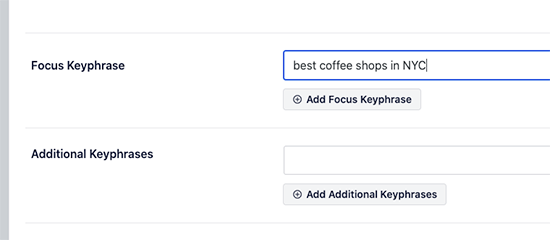
    Then, you have to find out the LSI keywords. These are your focus keyword related searches.

    The simplest way to discover them is just enter your focus keyword in the Google Search engine and scroll down to the end of the search results where you can get them listed under ‘related searches’.
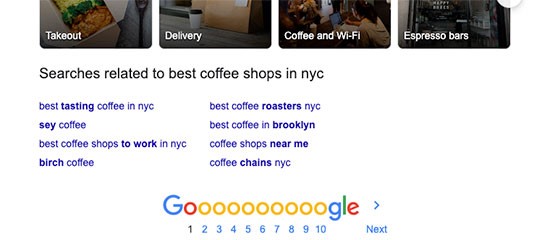
    You have to include as many of these keywords in your blog content, so you will have the best widespread content for users. But you should not stuff them in your content, as it will become odd to your users and search engines can easily detect keyword stuffing.

    3. Write an Effective Blog Post Title

    Your blog post title is extremely significant for search rankings. A good title for your blog post can make your article more appropriate to the search query. More significantly, it provokes users to actually click on your article among the other search results. By adding your focus keyword into the title you can create your blog post title SEO friendly.
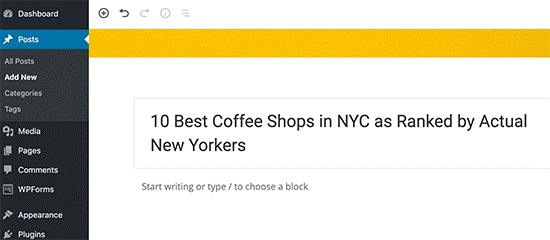
    Other than adding your focus keyword, we further recommend you to make catchy and click-worthy headline because CTR (click-through rate) plays a vital role in SEO.

    To write effective headlines there are numerous formulas. But EMV (Emotional Marketing Value) works the best. This formula recommends power words to trigger particular emotional responses in your users.

    If you use MonsterInsights plugin, then you will get a built-in tool as headline analyzer that will gives you a headline score inside the WordPress admin area. This also comprises real-time tips to improvise your title for increased click-through rates.
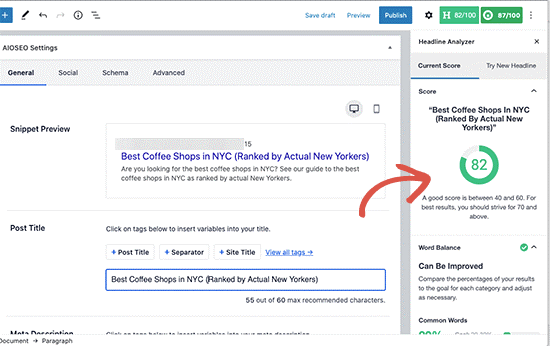
    There are some more online tools that you can use such as IsItWP Headline Analyzer to calculate your title’s EMV score.

    4. Make A Habit Of Internal Linking

    After you blogged for some time, you will have sufficient contents that you can suggest your users to read. With the help of internal linking, you can redirect new readers to check out your old related posts. Internal linking is one of the best ways to develop a appropriate connection between your new and old posts. It also helps you to pass significant link juice to your old articles. In WordPress you can easily search your old posts directly from the post editor. Just select the desired text that you want to link and click on the link button.
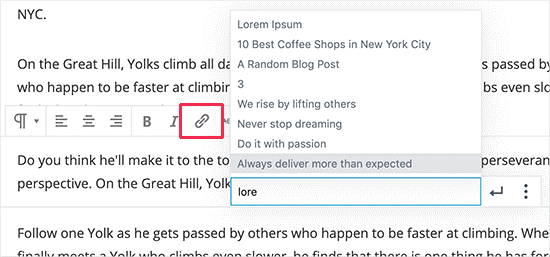
    A text pop-up will appear under your selected words. You can type and search the older articles there that you are willing to link here. Making a habit of internal linking will assure you that your on-page SEO is good, and your older articles will continue to gain new links.

    Beginners frequently make the mistake of doing one-way internal linking where they link new articles to older posts. But to get maximum benefits you should go back and edit your older posts to link to your new articles.

    5. Adding Images and Videos to Your Blog Posts

    Search engines mostly rank engaging content more in search results. And Images and Videos get more engagements than simple text. Therefore, your blog posts should contain images in between the paragraphs. Also, while adding images, you have to be careful regarding image copyrights. Habitually beginners simply copy images from other websites in their website, which can lead to legal trouble if the image was used without appropriate permissions.

    No Worries! There are numerous places where you can easily get royalty free images that you can use in your blog posts. Rather you can use your own original photographs or you can even create your own engaging graphics using websites like Canva. And don’t overlook SEO optimize of your images.

    Videos get more engagement when compared with images. You can even convert your blog posts content into videos by creating vlogs, slideshows, or you can also try-out other formats. But, you should not directly upload videos into your blog posts. Because WordPress is not augmented to serve videos, and your shared hosting service are also unable handle them. As per our suggestion upload your videos to YouTube. It is the 2nd most widespread search engine and the 2nd biggest social media platform after Facebook.

    6. Add a Meta Description to Your Blog Post

    Meta description is an HTML Meta tag added to any web page. The purpose of this tag is to give a short description to the search engines and other web crawlers to briefly explain your article. Certain SEO professionals believe that Meta description tag became irrelevant. Though, some disagree. At Build Websites, we prefer using the Meta description for all your posts.

    A proper Meta description can enlighten a lot about the article. Also, Social media websites such as Facebook, Twitter, and LinkedIn display it when you shared your articles on those platforms.
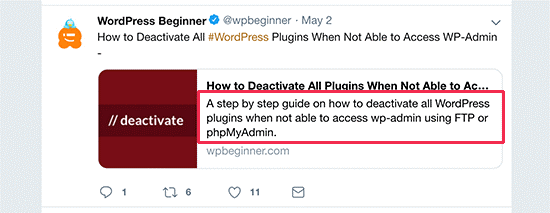
    Since people read your Meta descriptions, you have to make sure that your Meta description will be helpful.

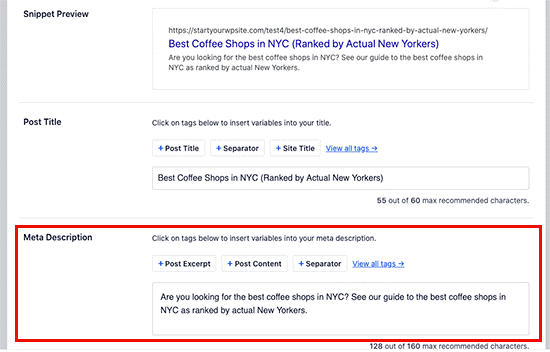
    Also, you have to ensure that you must use your focus keyword at least once in the Meta description for search purposes. The Meta Description generally has 155 characters limit.

    You must try to stay within the suggested character limit or else your Meta description will be truncated after 155 characters. Also, try to keep your focus keyword in the beginning portion of the Meta description rather than at the end.

    You can add Meta description, by scrolling down to the AIOSEO Meta box on your post edit screen.
    7. Make Your Articles Easier to Read

    Readability is a significant factor that is considered by search engines. Easy to read Articles often rank higher when compared other not user friendly articles. Till now computer and mobile screens didn’t became the optimal reading platform.

    Therefore, majority of users simply scan through the articles. In reality, stats say that users take less than a second to choose whether they need to stay on a page or exit. That’s a very little time for you to influence the visitor to stay in the page and scroll through. By improvising readability, you can make it your visitors to speedily scan through an article. You can improvise readability by having short sentences, small paragraphs, headings, punctuations, bullet points, etc. We also suggest you to add white space around the text and place images to make the text look easier on eyes. If you use the plugin All in One SEO, then it will automatically help you to analyse the readability issues and give you the suggestions in the analysis section.
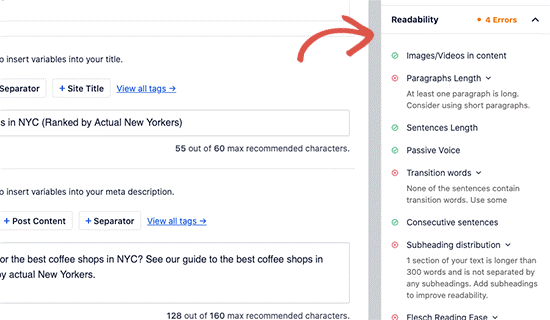
    You can even use Grammarly tools, which will allows you to check spelling, punctuation, grammar, etc. It also provides recommendations to increase the readability of your articles.

    8. Organize Content Using Categories And Tags

    You can sort your content using categories and tags for yourself and also for your readers and search engines. Many WordPress beginners use them incorrectly and face problems. If you consider your website as a book, then tags will be your index part and categories will be your table of contents. Categories usually divide your content into broad topics that is discussed on your blog. On the other hand, Tags are those topics that are discussed in a specific blog post.

    9. Aim To Appear As A Featured Snippet In The Search Result

    Google highly prioritize in answering user there queries as rapidly as possible. And for that reason, they introduced featured result or answer box.
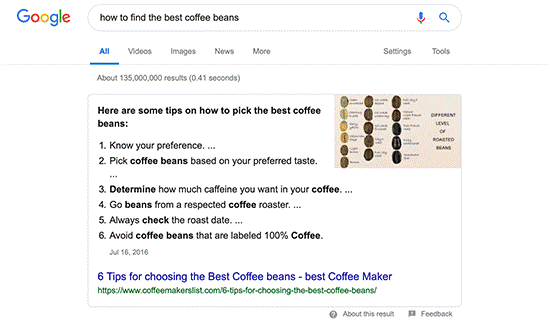
    It is a highlighted search result that comes on the top. Google creates a custom snippet from your article’s content by highlighting the specific portion that their algorithms consider as the answer for the user’s query.

    On the basis of the study done by Advanced Web Ranking, almost 32.3% CTR is secured by Answer boxes. This makes them highly significant for your SEO strategy.

    There is no exact set of commands given by Google concerning how they are going to choose the featured snippet. Their suggestion is to improvise your content and assure that it provides the best information they any users is looking for. However, at Build Websites, we can share you helpful tips on the basis of our research that will help your blog post to appear in Google answer boxes.

    10. Make Comprehensive Blog Posts

    Search engines always consider those articles that cover excessive detail about the topic. Therefore, we suggest you to collect the LSI Keywords (semantically related keywords) as one of the major step while you do your content planning.

    These correlated keywords provide you an idea of diverse variations of user searches for any specific topic. By including those keywords in your article, you will be able to create it more inclusive, informative, and convenient. You must include those keywords in your headings and subheadings and other possible places as you can.

    Other than LSI keywords, to make complete content you can type your preferred keyword and then shift to Image Search. There you will be able view topic bubbles with diversity of keywords.
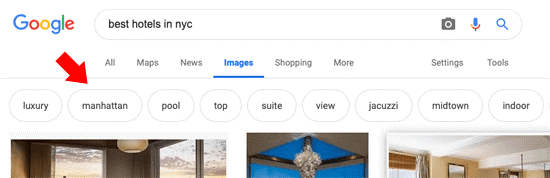
    To get the most comprehensive content we suggest you to including these while you creating your content.

    11. Optimize Older Blog Posts

    Most beginners forget about their blog post once they published it. Rather, even after publishing your blog post the SEO optimizing for the blog post is not done.

    You must consider the following things after publishing your blog post:

    • Promote it on Social Media – You must promote your blog post across all your social media profiles. You can also automate this by using IFTTT.
    • Add internal links – After publishing a post, you can go back to related old articles and add your new blog post’s link in it. This process will give link juice to your new articles and it will also help your users to find it easily.
    • Track search rankings – After you optimize your blog post for SEO, you have to keep track of its search rankings too.

    We suggest you should optimize your old posts on a regular basis, to constantly improve your rankings.

    Hopefully, this article was helpful for you to optimize your blog post for SEO like a professional.

    To gain knowledge or tips on other informative topics you can visit our blogs section in our website.

    If you feel this article was helpful for you or you like our other articles, then please do subscribe our YouTube Channel. You can even find us on FACEBOOK and INSTAGRAM as well.

    Thanks for reading.

  • Moving Easily Emails from one CPANEL email server account to another

    Moving Easily Emails from one CPANEL email server account to another

    Moving an email account (including old emails) from one cPanel server to another is pretty easy to do yourself if you have some knowledge of cPanel and FTP. When you move your existing web hosting to a different server you face the issue of migrating the emails from old cPanel to the new cPanel. Many a times I have seen website owner sacrificing all old mail during the server change process, because their developer does not know what to do. The fact is that it is a very easy process and can be completed within 5 to 10 minutes.
    Requirements

    1. FTP access to both new and old server.
    2. cPanel access to the new server.

    Here is a step by step approach to successfully move your cPanel mail from OLD server to NEW Server.

    Step 1: Create email account on the NEW SERVER/Hosting with the same E-mail id and password


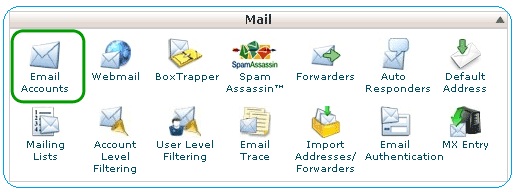
    Log on to the New Server CPANEL. Click the ‘Email Accounts’ icon and fill up the fields to create the email account. Make sure to keep the password same as the one you had on the Old Server. Choose any amount of disk space/unlimited you want.

    Step 2: Download and backup the email data from Old Server through FTP/CPANEL

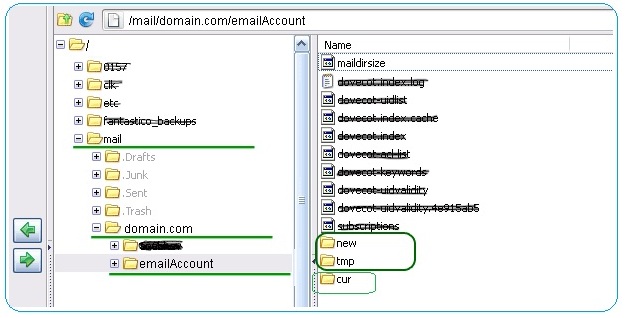
    Use a FTP program like CuteFTP, filezilla or FireFTP to connect to the Old Server. From the root directory navigate to “mail/domainame.com/emailAccount”. There will be a lot of files there but we need just two folders. So, download the “new” and “cur” directories to you local machine. Save this as a back-up of your old mails. If you have a lot of emails this could take a while. Once you are done, log out of the FTP connection.

    Step 3: Upload/Transfer Email files to NEW SERVER

    Log in to the New Server and like we did on the Old Server.
    Navigate to the “mail/domainname.com/emailaccount/” directory.
    Upload the “new” and ”cur” directories here by overwriting the existing one.( Replacement needed as the folder should already be created since you already created the account in step 1.)
    Depending on the size of your mails it may take a while to upload them.

    Step 4: Updating/Reset Mail Quota on New Server

    We are done, you can now access your mails from cPanel. But there is one bug to be fixed. Your mail account would still show you 0MB/500MB or something like that. That’s because we just created the account, and cPanel never had any records of the mails coming in. So we have to update the Mail Quota.
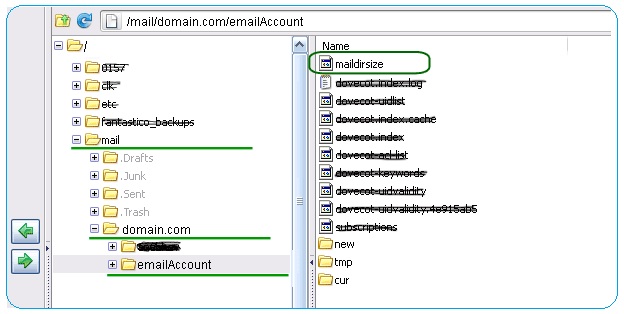
    In the same directory where we added the email files in step 3 locate the maildirsize file. Both the server will have the file. Copy the contents from maildirsize file on Old Server to the one on the NEW SERVER.

    (Alternate Process: FTP to the OLD SERVER, open up the maildirsize file at “root/mail/domainname.com/emailAccount” and copy all of the contents and paste them into the maildirsize file on the NEW SERVER. You may have luck copying the maildirsize file on the OLD SERVER and pasting it on the NEW SERVER, however this did not work for me.)

    If the above step does not work for you, try editing the maildirsize file on New Server so that it matches the values on the Old Server.

    For your information:

    1. 1st row: 2097152000/1024/1024 = Available Space in B
    2. 2nd row: 1682448126/1024/1024 = Used Space in B
    3. From 3rd row they are sizes for more folders in your account.

    We are done now.

    Step 5: Update your NameServers from your domain

    You can update name servers from your domain registrar. Go to the domain control area where you will need to change two entities from ns1. oldnameserver.com and ns2.oldnameserver.com to ns1.newnameserver.com and ns2.newnameserver.com. It takes somewhere between an hour to 24 hours to take effect, but sometimes DNS propagation might be done within 15 minutes
    (Remember the Nameserver may still need some time to update. Wait for it.) Your new email account should now have all the old mails and folder exactly like your Old cPanel email account.

    Enjoy your time. Have fun.
    Thanks for reading this.

  • Reasons Why Promotional Activities Are Necessary For A Business

    Reasons Why Promotional Activities Are Necessary For A Business

    The principal objective of any business owner is to attract maximum customers. It is always a great fact that fewer customers result in little profitability, which directly harms business growth. Certainly, the only best way to attract customers successfully is by concentrating on various business promotional activities.

    Without focusing on promotional or marketing activities, nowadays it is impossible to search for any business. To boost your business profitability, customers play an important role that passively helps businesses to reach greater heights. To step towards the way of progress every business follows unique strategies for business promotion to attract and retain customers.

    It may be bit difficult for you to promote your services or products but it is impossible. To avoid unpredicted downfall of your business profitability, you should always continue business promotion activities with proper marketing strategies.

    Some major significance of promotional activities is briefly explained below for you.

    Promotional Activities Necessities:
    • Helps to reach thousands of potential consumers.
    • Helps more people to know about your services or products.
    • Helps to build a wonderful online reputation.
    • Helps to attract more consumers to boost business turnover.

    The only best way to improve communication with your consumers and clients is business promotion.

    An appropriate business promotion approach also offers great business expansion opportunity in near or far future.

    A very good business promotion can turn any company into a brand. Therefore, it is very important for every company to have their own promotional strategies. Though, incorrect promotional strategies can also lead to reputation and profitability degradation for your business. Therefore, to take your business to the next level it is very essential to make your business promotional strategies wisely.

    You can even contact us to get the best business marketing strategy as per your business need.

  • Trustworthy Tricks To Promote Your Business Online

    Trustworthy Tricks To Promote Your Business Online

    It is well-known that for any business to touch the way to success online promotion is the only best technique. Low business promotion activities can drastically lead your business towards its end. Therefore, the majority of current business owners always involve themselves in formulating outstanding promotional strategies.

    It doesn’t matter how outstanding services you serve or how great products you offer if you are unable to make people know about those. You will never understand without business promotion you are losing how many potential customers every day. Therefore, it is very important for every organization to promote their business online with effective strategies.

    Yet, online business promotion is never been so easy. The digital world not only has potential customers but it is also filled with competitors. Therefore, you must know some tricks using which you can promote your business online. Some key online business promotion tricks are briefly described below for you.

    5 Effective Business Promotion Tricks:

    • Business listing is immensely essential and it is considered as the first step. So, list your business in any online directory to help consumers learn about your business anytime.
    • Another most important trick is SEO (Search Engine Optimization). It efficiently helps business to keep their website at the first page of Google search, which is essential to attract consumers.
    • Collect appropriate reviews for the review section of your business listing. Actually, still there is a huge amount of people who totally rely or depend upon the reviews before choosing any service or product.
    • Always retain a splendid business presence on social media. As, it is one of the easiest way to influence great number of people, because, majority of people remain active on social media other than anywhere else.
    • Building an attractive website will be a wise decision. It is mandatorily very essential to elevate the reputation of your business.

    Other than these, giving attractive offers and discounts on your services or products is also a dependable promotional strategy. It will help you to drag consumers’ attention towards your business when compared with your competitors. In fact, consumers are always the turn-key solution for any business growth.

    To know more details about online business promotion get in touch with us now!

  • Key Benefits Of Business Listing You Must Know About

    Key Benefits Of Business Listing You Must Know About

    In today’s digital world it is difficult to discover that business owner who is unaware of the essentiality of the business listing. To reach a maximum of potential customers it is very significant for a business to have an online presence. Indeed, if any business fails to keep an outstanding online presence, then certainly they may face a great breakdown.

    Business listing is the process of introducing detailed business information to the search engine which will help you to maintain your business ranking along with reputation and revenue. Once you list your business organization, it will help people to understand about your business by knowing complete detail about it and as a result it will convert them into your potential customers. Nowadays, every successful business organization is maintaining their online presence responsibly and it is boosting their business profitability passively.

    Business listing has huge advantages, let’s learn about them briefly with the below mentioned points.

    Important benefits of business listing:

    • Anyone from anywhere of the globe can easily learn about your products and services.
    • After you list your business it will help you to maintain competitive edges.
    • Without business listing it is impossible to generate proper web traffic.
    • Since a bigger percentage of population prefer search engine to learn anything about any service or product, therefore business can take advantage of it with the help of business listing advertising.
    • To effectively boost your business profitability in a very short period of time, listing business products in online directories is very helpful.

    The great thing is business listing will help people quickly connect with your business by informing them about your business existence. Though, you have to be careful about the consistency of your business details in all the directories, because same information in several directories can decrease the probabilities of confusion.

    To know more in-depth details about business listing get in touch with us now!

  • Mentionable Pros and Cons of Affiliate business model

    Mentionable Pros and Cons of Affiliate business model

    It is an all-time well-known fact that the development and growth of any business wholly depends upon its business model. In other words, this is literally impossible for any business owner to reach the path of progress without forming a work worthy business model. As a matter of fact, affiliate marketing is considered as one of the world’s leading business strategies currently.

    Affiliate marketing is an explicit business model in which a business rewards another business for referring consumers. These rewards are produced as a revenue share for any particular sale. Here, the affiliate receives a definite commission amount. Knowledgeably, a great amount of business owners made wise decision by showing willingness in this business model.

    However, there are some pros and cons of Affiliate business models. Below we are evaluating some of them briefly for you.

    Pros Of Affiliate Business Model

    • This is the easiest among all. A setup can be run very easily with no complications.
    • There can be unlimited income streams as you can run the business with as many merchants you want.
    • No mountain-sized costs are needed to take the first step.
    • Most of all, if you are an expert in search engine optimization, then you can completely focus on the traffic generation and search engine ranking.

    Cons Of Affiliate Business Model

    • The competition in the world market always remains higher. In brief, it is easy for you as well as your business competitors.
    • The advertising risks will always remain upon you. You will be carrying the risk of the merchant facing a downfall of sales.
    • The potential of growth is a bit limited in case of affiliate marketing as it is not possible to adapt any deals or lock any consumer to keep going with changing market demands.

    Except all these, currently affiliate business model is one of the most widespread business models. As per research, people interested in this business model are enormously increasing globally. For more information consult a specialist now!

  • How To Redirect HTTP to HTTPS using .htaccess file (Apache Server)

    How To Redirect HTTP to HTTPS using .htaccess file (Apache Server)

    When you are adding SSL for your websites to make it’s secure, your web server will also continue to serve the HTTP version of your webpages. So to get Website Visitor/your audiences’ attraction, you need to redirect HTTP to HTTPS, and force SSL on your website. Here’s I am giving some examples “how to redirect HTTP to HTTPs using .htaccess file in Apache web server”.

    Steps to Redirect HTTP To HTTPS Using .Htaccess File

    Before you start the things-Kindly ensure you have mod_rewrite enabled in your Apache server. Then only your Apache server will apply the configuration in .htaccess file. After migrating your website from HTTP to HTTPS, you may need to use a database reporting software for monitoring the key metrics about your website/application like signups, purchases, revenue, etc. with the help of dashboards & charts, to make sure everything is working smoothly and issues are spotted early.

    Open .htaccess file

    You will usually find .htaccess file in the root folder (e.g /var/www/html/) of your site. You can open it with the help of code editor

    $ sudo vim /var/www/html/.htaccess

    Add Rewrite Rule to .htaccess

    Add the below mentioned rules to your .htaccess file, for redirecting HTTP to HTTPs

    RewriteEngine on

    # force ssl

    RewriteCond %{SERVER_PORT} ^80$

    RewriteRule ^(.*)$ https://%{SERVER_NAME}%{REQUEST_URI} [L,R=301]

    If the requested port is 80 (default for HTTP) then the above rewrite condition will check. In that case, it will match the entire URL and redirect to its HTTPS version. The server variable for website’s root URL is SERVER_NAME, and the URL stub that follows the domain name is REQUEST_URI. For permanent redirect here we use a 301 redirect. If you don’t need a permanent redirect then just use ‘R’ instead of ‘R=301’ in the above RewriteRule.

    By using virtual hosts also, you can redirect HTTP to HTTPS in your virtual host’s config file.

    <VirtualHost *:80>

    ServerName www.example.com

    Redirect permanent / https://www.example.com/

    </VirtualHost>


    <VirtualHost _default_:443>

    ServerName www.example.com

    DocumentRoot /var/www/html/example

    SSLEngine On

    # etc…

    </VirtualHost>


    In above mentioned case, we want to set up 2 virtual hosts – one for HTTP and the other one for HTTPS. The HTTP virtual host easily redirects all its requests to the HTTPs one. You can even use URL redirection to redirect to subfolder or redirect subfolder to subdomain.

    Restart Apache Server

    Restart Apache Server to apply changes

    $ sudo service apache2 restart

    Enjoy!

    For more guidance contact experts!

  • Regarding Domain Transfer Secret Or Authorization (Auth) Code And How To Obtain It From Your Current Registrar?

    Regarding Domain Transfer Secret Or Authorization (Auth) Code And How To Obtain It From Your Current Registrar?

    At the time of domain name registration the code assigned by the Registrar is called as Domain Transfer Secret or Authorization (Auth) Code. To ensure the owner/registrant of the domain can only Transfer their domain name, this Domain Transfer Secret works as a password for a domain. Obtain the Domain (Transfer) Secret or Auth first as it is very essential for transferring any domain name for any below mentioned TLDs (extensions). Code from your Current Registrar:

    NOTE:

    For a .EU domain name the Authorization Code will be in XXXX-AAAA-BBBB-CCCC format where XXXX is the plain-text identifier for the current Registrar, and AAAA, BBBB and CCCC are four random characters (letters & digits) blocks separated by dashes.

    After request, Registrar generates the Authorization Code which is valid for 40 days’ time period. Every time when the code is requested, a new Authorization Code will generate on the spot, which will replace the previous one and will remain valid for 40 days.

    The request submitted for the duration of the first day (24 hours from the time of first request) of the validity time period of the code will not result in generating a new code. Then the same code will return from that request with same remaining validity time period.

    Example:

    If on 15 Dec 2012 at 11.00 AM GMT the first request for the Authorization Code is made. Then an Authorization Code will generate with 40 days validity. And all the further code requests made within the next 24 hours (16 Dec 2012 11.00 AM GMT) will return same code with same remaining validity time period. All requests which are made after the first 24 hours will return a new Authorization Code.

    Immediately after use, the Authorization Code linked with a .EU domain name will become invalid. For a .NZ domain name, upon Registration, the Registry directly allocates a code called as Unique Domain Authentication ID (UDAI). At the time of transferring a .NZ domain name from one Registrar to other one, the Unique Domain Authentication ID (UDAI) is vital for authentication.

    Preferably, the Domain (Transfer) Secret or Auth Code of your domain name provided by your Registrar should be available inside the Control Panel. If you are unable to trace your Domain (Transfer) Secret or Auth Code, you have to contact your Current Registrar’s Support Team, to obtain the same.