Blog
Dark Mode Websites: Trend or Necessity in 2026?
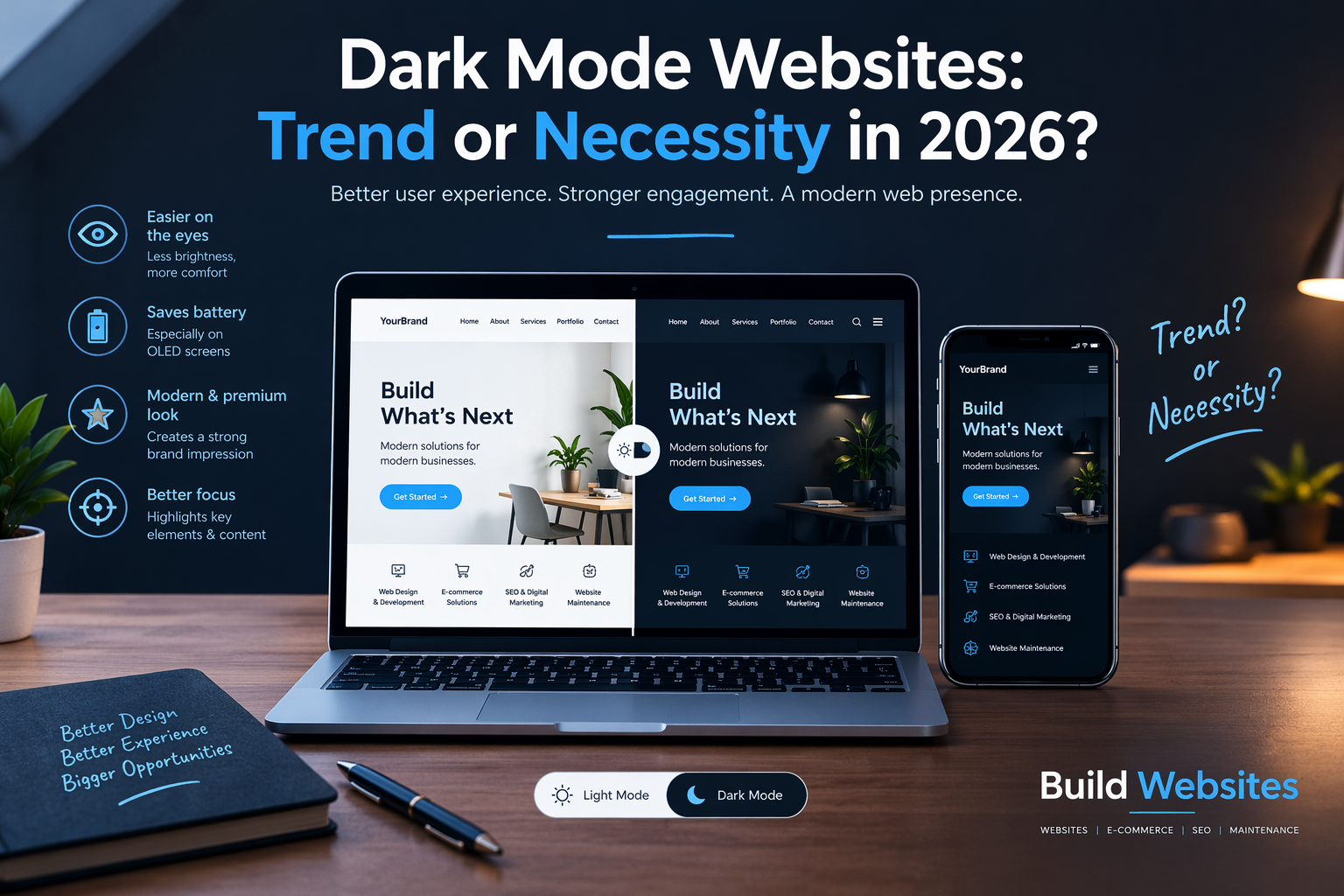
Website design trends continue to evolve, and one feature that has remained popular over the years is Dark Mode. From smartphones and desktop applications to social media platforms and business websites, dark interfaces have become increasingly common.
But is dark mode simply a visual trend, or has it become a necessity for modern websites in 2026?
The answer depends on your audience, website purpose, content, and overall user experience. While dark mode offers several advantages, it is not automatically the best choice for every website.
Let’s explore the benefits, limitations, and best practices of using dark mode in modern website design.
What Is Dark Mode in Website Design?
Dark mode is a website display option that uses dark backgrounds with lighter text and interface elements.
Instead of the traditional white or light-coloured background, dark mode generally uses shades of black, charcoal, dark grey, or navy blue.
A typical dark-mode website may include:
- Dark background colours.
- White or light-coloured typography.
- Muted secondary text.
- Bright accent colours for buttons and links.
- Subtle borders and shadows.
- Dark-themed navigation menus and interface elements.
Some websites offer dark mode as the default appearance, while others allow visitors to switch between light and dark themes.
Why Are Dark Mode Websites Popular in 2026?
Dark mode has gained popularity because users increasingly expect flexibility and comfortable digital experiences.
Here are some reasons behind its growing adoption.
1. A Modern and Premium Appearance
Dark backgrounds can create a sophisticated and contemporary visual experience.
They work particularly well for:
- Technology companies.
- Creative agencies.
- Gaming websites.
- Photography portfolios.
- Entertainment platforms.
- Premium product brands.
When combined with carefully selected typography, accent colours, and spacing, dark mode can give a website a distinctive visual identity.
However, a dark interface alone does not make a website look professional. Good layout, consistency, and usability remain essential.
2. Reduced Brightness in Low-Light Environments
Bright screens can feel uncomfortable when someone is browsing in a dark room.
Dark mode reduces the amount of bright interface area displayed, which some users find more comfortable during nighttime browsing.
However, dark mode does not automatically prevent eye strain. Text size, contrast, screen brightness, viewing distance, and browsing duration also influence visual comfort.
3. Potential Battery Savings on OLED Displays
Dark mode can help reduce power consumption on devices with OLED or AMOLED displays.
These displays can turn off individual pixels when showing true black, reducing the power required for those pixels.
However, the savings depend on the display technology, brightness level, colours used, and device.
On traditional LCD screens, dark mode generally does not provide the same battery-saving benefit.
4. Better Focus on Certain Visual Elements
Dark backgrounds can make selected elements stand out.
For example:
- Bright call-to-action buttons.
- Product photography.
- Videos and visual content.
- Charts and data visualisations.
- Creative portfolio projects.
This can make dark mode particularly useful for websites where visual content plays an important role.
Is Dark Mode Suitable for Every Website?
No. Dark mode is not a universal design solution.
Different websites serve different audiences and purposes. A colour scheme that works beautifully for a gaming website may not be suitable for an educational platform or a content-heavy business website.
Consider these examples:
| Website Type | Dark Mode Suitability |
|---|---|
| Technology websites | High |
| Gaming websites | High |
| Creative portfolios | High |
| Photography websites | High |
| E-commerce websites | Depends on products and branding |
| Corporate websites | Depends on brand identity |
| Educational websites | Requires careful readability testing |
| News and blog websites | Depends on reading experience |
| Healthcare websites | Requires careful contrast and clarity |
For websites with long articles, documents, or extensive reading material, light mode may remain more comfortable for many visitors.
The best approach is to understand your audience rather than following a design trend blindly.
Dark Mode vs Light Mode: Which Is Better?
Both themes offer advantages and limitations.
| Feature | Dark Mode | Light Mode |
|---|---|---|
| Visual appearance | Modern and dramatic | Clean and traditional |
| Low-light browsing | Preferred by some users | Can feel bright |
| Long-form reading | Depends on user preference | Often familiar and comfortable |
| Product presentation | Works well for selected products | Often suits a wide range of products |
| Brand personality | Bold and premium | Open and professional |
| OLED battery usage | Potential savings with darker pixels | Usually higher for bright content |
| Accessibility | Requires careful contrast testing | Also requires careful contrast testing |
There is no single winner. Both can provide excellent user experiences when implemented properly.
Important Things to Consider Before Implementing Dark Mode
Adding a dark theme involves more than changing the background colour. A poorly implemented dark mode can make a website difficult to navigate and read.
Here are some important design considerations.
1. Maintain Proper Colour Contrast
Text must remain readable against the background.
For normal text, the WCAG 2.2 AA contrast guideline recommends a minimum contrast ratio of 4.5:1. For large text, the minimum is 3:1.
Avoid using dark grey text on black backgrounds or overly bright colours that create uncomfortable visual contrast.
2. Choose Colours Carefully
Pure black is not always the best background choice.
Many modern interfaces use dark charcoal, deep navy, or slightly lighter grey shades to create visual depth.
For example:
- Background:
#121212 Card background:#1E1E1EPrimary text:#FFFFFFSecondary text:#B3B3B3Accent colour:#1495D9
These are starting points, not universal design rules. Always test the final colour combinations for readability and brand consistency.
3. Pay Attention to Images and Graphics
Images designed for a white background may not look good when placed inside a dark interface.
Logos, transparent PNG files, product photographs, illustrations, and icons should be checked to ensure they remain visible.
You may need alternative image treatments or theme-specific logo versions.
4. Make Buttons and Links Easy to Identify
Visitors should immediately understand which elements are clickable.
Use clear accent colours, consistent button styles, visible hover states, and appropriate focus indicators.
Do not depend on colour alone to communicate important information.
5. Test Forms and Navigation Elements
Forms, dropdown menus, search fields, pop-ups, and navigation bars must also adapt to the selected theme.
A common mistake is changing the main website background while leaving form fields or other components in their original light appearance.
Every major interface element should be tested in both themes.
Should You Add a Dark Mode Toggle to Your Website?
If your audience may prefer different display settings, offering both light and dark modes can improve flexibility.
A theme toggle allows visitors to choose the appearance they find most comfortable.
Here are some recommended practices:
- Provide a clearly visible light/dark mode switch.
- Respect the visitor’s device theme preference when appropriate.
- Remember the visitor’s selected theme across pages.
- Ensure all website elements adapt correctly.
- Maintain sufficient colour contrast.
Test the design on desktop, tablet, and mobile devices.
You can also use the CSS prefers-color-scheme media feature to detect a visitor’s operating system theme preference.
For example:
/* Default light theme */
body {
    background: #ffffff;
    color: #222222;
}

/* Dark theme preference */
@media (prefers-color-scheme: dark) {
    body {
        background: #121212;
        color: #ffffff;
    }
}
This is a basic example. A complete implementation should also account for cards, navigation, buttons, forms, images, and manually selected theme preferences.
Common Dark Mode Design Mistakes to Avoid
Even attractive dark websites can create usability problems when the design is not implemented carefully.
Avoid these common mistakes:
1. Using pure black everywhere: Large areas of pure black can make the interface feel visually flat. Consider using different dark shades to create depth.
2. Using low-contrast text: Grey text on a dark background can become difficult to read, especially at smaller sizes.
3. Ignoring brand identity: Your dark theme should complement your existing brand colours rather than making the website look unrelated to your business.
4. Forgetting mobile users: A theme that looks good on a desktop monitor may not provide the same experience on smaller screens.
5. Changing colours without testing images: Logos, icons, and product images may become difficult to see against darker backgrounds.
6. Forcing visitors to use dark mode: Give users a choice whenever possible, particularly on websites where people spend a long time reading.
The Future of Dark Mode Website Design
In 2026, website design is increasingly focused on personalisation and accessibility.
Rather than forcing everyone to use the same interface, modern websites can offer experiences that adapt to individual preferences.
Dark mode is part of this shift.
We can expect more websites to focus on:
- Adaptive light and dark themes.
- Personalised interface preferences.
- Accessible colour combinations.
- Consistent experiences across devices.
- Theme-aware images and design elements.
- Reduced visual clutter.
The objective is not simply to make websites look attractive. It is to make them easier and more comfortable to use.
Final Thoughts: Trend or Necessity?
Dark mode is no longer just a passing design trend, but it is not a necessity for every website either.
For technology platforms, creative portfolios, gaming websites, and certain e-commerce brands, it can provide a distinctive and engaging experience.
For educational platforms, corporate websites, and content-heavy websites, a well-designed light theme may still be the better default.
The smartest approach is to focus on your visitors, understand their preferences, and provide a consistent experience across different devices.
Good website design is not about following every trend. It is about choosing the right design elements to make your website more useful, accessible, and engaging.
At Build Websites, we create modern, responsive websites that balance visual appeal with functionality and user experience. Whether you need a fresh website design or want to improve your existing website, our focus is on building digital experiences that support your business goals.
Share this post

Contacts
-
D-45/A/4, Shibalaya, 2nd Floor, Module - S1, Rabindrapally, Kolkata -700086, West Bengal, India
-
We Accept:
